
Snap! Mobile
Snap! Mobile IncSports
3.037.00 Reviews
- Version
- 172.24.3
- Installs
- 100.00K
- Age Rating
- Everyone
Screenshots
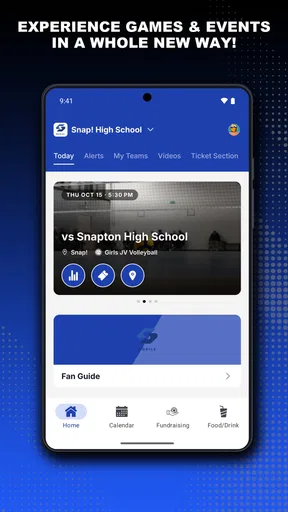
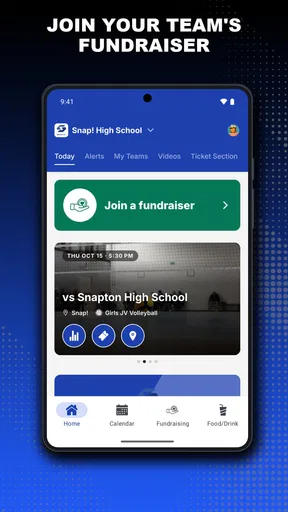
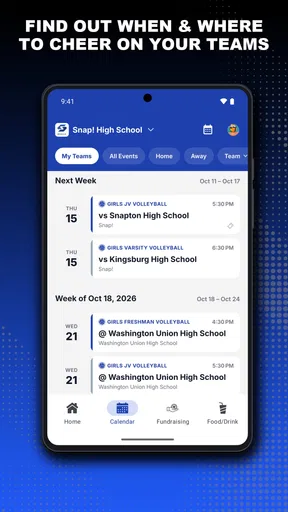
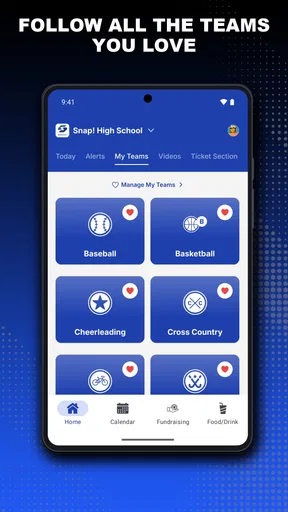
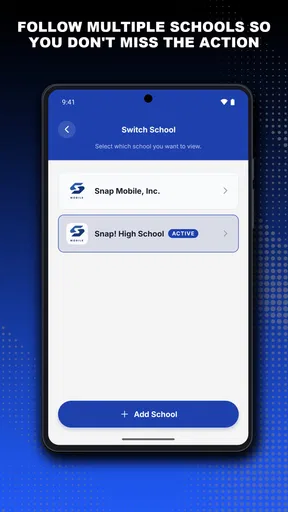
Our Review of Snap! Mobile
 Analysis by Appyee
I approached Snap! Mobile as a practical sports app rather than as another general-purpose social platform. Its purpose is to bring athletics and activity-related work into one mobile experience, which makes it most relevant to athletes, families, coaches, and people involved in organized programs. After spending time with it, my impression is mixed but useful: the idea is sensible, the free entry point is appealing, and the app can become a convenient part of a team routine, but its value depends heavily on whether the organization around you already uses it.
That last point matters more than it might seem. This is not the kind of app I would install simply because I want a private workout log or a broad sports-news feed. It is better understood as a shared activity platform. When the people who manage your athletics program use it consistently, the app has a clear reason to exist. When they do not, there may be little for an individual user to do with it. The real question is not only what the app offers, but whether your team has built its daily workflow around it.
How Snap! Mobile fits into an athletics routine
Snap! Mobile is a free sports app from Snap! Mobile Inc, aimed at supporting athletics and activities. It is available to an Everyone-rated audience, so its intended reach includes young participants and families as well as adult users. The app has passed 100K installs, while its average sits at 3.0 from more than 100 ratings and several dozen written reviews. Those figures suggest a product with a real user base, but also one that has produced uneven experiences.
In practical terms, I would place it closer to a team or program companion than to a standalone fitness tracker. A runner looking for route mapping, a cyclist wanting detailed ride analysis, or someone who simply wants a personal exercise diary would probably be better served by an app designed specifically for that purpose. Snap! Mobile makes more sense when information needs to move between several people connected to the same athletic activity.
A realistic example is a parent whose child participates in a school athletics program. Instead of relying on scattered messages, paper notices, and last-minute reminders, the family can use the app as one place to follow the program’s mobile activity. The benefit is not necessarily a dramatic new feature; it is the reduction of small points of friction. A participant can check the app before leaving home, while a parent can use the same routine to stay aligned with what the program is communicating.
That shared context is also the first limitation. If a coach, school, club, or activity organizer only uses the platform occasionally, the app cannot create useful information by itself. I would not recommend installing it on the assumption that it will automatically discover every local team or populate a complete personal sports profile. Its usefulness begins when there is an existing connection to an organized activity.
Who is likely to get the most from it
The strongest audience is made up of people who already belong to an athletics structure: students, parents, coaches, volunteers, and participants who need a mobile point of contact. It can be especially practical for families managing more than one child or more than one activity, because a single sports-focused app is easier to check than a collection of unrelated communication channels.
Coaches and organizers may also appreciate the idea of keeping activity-related information close to the people who need it. However, the app should not be judged only from an administrator’s perspective. A platform can be well intentioned and still feel inconvenient to participants if updates are inconsistent or if users have to open it repeatedly without finding anything new.
I would be more cautious about recommending it to someone who trains alone. For that person, the usual alternatives—dedicated workout trackers, running tools, calendar apps, or direct messaging—may provide a clearer benefit. Snap! Mobile is not automatically a replacement for those tools. Its advantage is coordination around athletics, not necessarily depth in one individual sport.
What the current release tells me
The current version is 172.24.3, and the app was released on December 20, 2023. Those details place the product in a relatively recent stage of its public life, while the version number indicates that it has moved through multiple iterations rather than remaining at its first release. I see that as a sign of ongoing maintenance, but not as proof that every rough edge has been solved.
That distinction is important when reading version information. A newer version can mean bug fixes, compatibility work, or internal changes that users barely notice. It does not necessarily mean a complete redesign or a major expansion of the service. In my view, the sensible expectation here is gradual refinement: a platform being adjusted as real teams and families use it, rather than a finished product that already covers every possible athletics workflow.
The minimum operating-system requirement is Android 10. For people using a relatively recent phone, that should make the installation decision straightforward. Anyone keeping an older device should check compatibility before planning to rely on the app for an important team routine. This is a small detail, but it can become a major problem when a parent or athlete discovers the requirement only after an organizer has asked everyone to use the platform.
How the evolution affects people already using it
For existing users, the most meaningful effect of version changes is continuity. An athletics app is useful only if people can open it when they need it and trust that their familiar routine still works. A version update that quietly improves stability can matter more than a visible new option, especially when the app is being used before practice, during a competition day, or while a family is coordinating travel.
At the same time, users should avoid assuming that an updated version changes the role of the product. If your team has already adopted Snap! Mobile, the best way to evaluate an update is to look for practical improvements in your own routine: Is it easier to find the activity you need? Are important updates easier to notice? Does the app behave consistently on your phone? Those are better tests than simply looking at the version number.
I also recommend that established users keep a backup habit for time-sensitive details. This is not a criticism unique to Snap! Mobile; any shared communication tool can become a weak point if one person misses an update or if a device has a problem. For an important event, I would still check the organizer’s direct message or official notice when available. The app can be the convenient center of a routine without being the only place a family ever looks.
Another useful habit is to separate information you need to act on from information you are merely browsing. When I use a sports platform, I prefer to open it with a purpose: check today’s activity, review a relevant update, or confirm what applies to a particular participant. That approach prevents the app from becoming another stream that demands attention without helping me make a decision.
Where the experience can feel limited
The 3.0 average rating is a reminder to keep expectations measured. A rating like that does not tell me that the app is unusable, but it does suggest that the experience has not been consistently smooth for everyone. With a platform tied to organizations, some frustration may come from how a program uses it rather than from the software alone. Still, the distinction does not make the frustration less real for the person trying to find an update.
The biggest potential gap is dependence on participation. A sports app can have a clean concept and still feel empty if the local program does not post regularly or if different groups use different communication methods. Before treating it as your main athletics tool, I would ask the coach or organizer exactly what they expect members to do inside the app. Do they use it for routine updates, activity information, or only occasional announcements? The answer will tell you more than the store summary.
There is also a trade-off between centralization and flexibility. Putting activity information in one place can reduce clutter, but it can also make users dependent on one platform’s organization and habits. If you are someone who wants highly detailed personal statistics, customizable training plans, or sport-specific analysis, this may feel too broad. Its strength is the shared program layer, not necessarily specialist depth.
I would also avoid installing it for a child without first explaining the purpose in simple terms. An Everyone content rating makes the app broadly suitable, but suitability is not the same as usefulness. Young athletes still benefit from knowing why they are opening it, what information matters, and when a parent or coach should be asked for help. A short family routine—check the app at a set time, then confirm anything important—can make the experience more manageable.
Three practical ways to use it more effectively
First, establish one predictable checking point instead of repeatedly reopening the app throughout the day. For a family, that might be after school or before leaving for practice. This turns Snap! Mobile into a deliberate tool rather than a source of constant interruptions. It also makes it easier to notice whether the program is actually keeping information current.
Second, use the app as the first step in a confirmation workflow, not as a substitute for judgment. If an update affects transport, equipment, attendance, or a competition plan, read it carefully and confirm details that could cause a problem if misunderstood. The non-obvious advantage of this approach is that it keeps the app central while acknowledging that sports logistics often involve several people.
Third, separate household organization from personal training. Let Snap! Mobile handle the athletics connection your program expects, but keep a dedicated tool for private goals if you need detailed progress tracking. Trying to force one app to manage team communication, personal workouts, calendars, and long-term performance can make any platform feel disappointing. This division of labor is likely to produce a better experience than expecting Snap! Mobile to replace every sports-related app on your phone.
A fourth tip is useful for coaches and organizers: decide what belongs in the app before asking families to depend on it. If routine updates are mixed with occasional information and duplicated elsewhere, users may stop checking. A consistent publishing habit gives the platform more value than simply having everyone install it. In that sense, the quality of the surrounding workflow is part of the product experience.
How it compares with familiar alternatives
Compared with direct messaging, Snap! Mobile offers a more athletics-centered destination. A group chat may be faster for urgent conversation, but it can bury important information under replies, jokes, and unrelated questions. A dedicated sports platform has the potential to keep the context clearer. The trade-off is that every participant must remember to open another app, and the organizer must use it consistently.
Compared with a calendar, it can be more connected to the activity itself, while a calendar remains better for personal scheduling and reminders. I would use a calendar to protect travel time and appointments, not necessarily as the only place to follow an athletics program. Compared with a fitness tracker, Snap! Mobile is less about measuring an individual’s effort and more about staying connected to an organized activity. Choosing between them depends on whether your main problem is coordination or training analysis.
This is why I would not describe it as a universal sports solution. It occupies a narrower but potentially useful space. If your school, club, or activity group has embraced it, the shared context may outweigh the limitations. If you are searching independently for a training companion, the alternatives may be more focused and immediately rewarding.
What I would watch as the app continues to develop
For future updates, I would pay attention to improvements that make shared information easier to trust and act on. Clearer organization, dependable access, and a smoother path from opening the app to finding the relevant activity would matter more to me than cosmetic changes. Those are the areas that determine whether a family keeps the app in its regular routine after the initial installation.
I would also watch how the product balances broad athletics support with the very different needs of teams, schools, and individual participants. A platform serving several kinds of activities has to remain simple enough for families while still being useful to organizers. That balance is difficult: too little structure makes information hard to follow, while too much complexity can discourage casual users.
The current version shows that development is continuing, but I would judge future progress through everyday reliability rather than promises. Does the app remain useful when a program is busy? Does it help users find the right information without unnecessary effort? Does it work equally well for the organizer and the person who only opens it once in a while? Those questions will determine whether the platform grows into a dependable athletics companion.
My recommendation for different kinds of users
I would recommend trying Snap! Mobile if your coach, school, club, or activity organizer already uses it and has explained how it fits into the routine. The fact that it is free removes one barrier, and the sports-focused purpose gives it a reasonable place on a family’s phone when several people need to stay connected to organized activities.
I would skip it if you are looking for a private workout tracker, advanced sport analysis, or a general-purpose calendar. In those situations, a specialist alternative will probably give you more useful information with less dependence on other people. I would also hesitate if your local program rarely updates the platform, because no app can compensate for an inactive communication workflow.
Overall, I see Snap! Mobile as a practical but conditional tool. Its best experience comes from a coordinated athletics community, not from solo exploration. The free price and Everyone rating make it approachable, while the current release history suggests an actively maintained product. Yet the 3.0 average means I would install it with realistic expectations and test it against one simple standard: does it make my actual sports routine easier to manage?
For me, that is the fairest conclusion. Snap! Mobile is worth having when it becomes the shared habit of your team, but it is not a compelling standalone sports app for everyone. If the people around you use it well, it can reduce scattered communication and give athletics-related information a clear home. If they do not, I would choose a more focused alternative rather than keeping another app installed out of obligation.
Verdict
Strengths of Snap! Mobile
- Simple interface makes everyday tasks easy to find and use.
- Quick access to key features reduces time spent navigating menus.
- Useful notifications help users stay updated without opening the app.
- Works well for casual use on most modern Android and iOS devices.
- Convenient mobile access makes the service available while traveling.
Limitations of Snap! Mobile
- Some features may require a stable internet connection to work properly.
- Older devices may experience slower loading or reduced performance.
- Notification settings can feel limited for users wanting finer control.
- The app may use noticeable battery during frequent background activity.
- Availability of certain features can vary by region or account type.
Similar Picks in This Category
View All
BeSoccer: Soccer Live Score
BeSoccer apps4.3

Cricbuzz - Live Cricket Scores
Cricbuzz.com3.7

NFL
NFL Enterprises LLC2.4

Da Fit
MO YOUNG LIMITED3.6

ESPN
Disney4.5

LiveScore: Live Sports Scores
LiveScore Limited4.5
Frequently Asked Questions
What is Snap! Mobile, and what can I use it for?
Snap! Mobile is a mobile platform designed to help users access Snap!-related content and services from an Android or iOS device. Depending on the version and region, it may provide tools for viewing updates, managing account information, receiving notifications, or interacting with available features. Before downloading, check the official listing to confirm the exact functions offered by the current release.
Is Snap! Mobile free to download and use?
Snap! Mobile may be available as a free download, but some features or services could require an account, subscription, payment, or access provided by an organization. Installation costs and in-app charges can vary between Android and iOS. I recommend reviewing the app-store description, pricing details, and any trial conditions before registering or entering payment information.
Which devices and operating systems are compatible with Snap! Mobile?
Compatibility depends on the current version of Snap! Mobile and the requirements published in Google Play or the Apple App Store. Most recent Android and iOS devices should be supported, although older phones or tablets may not work correctly. Check the listed minimum operating-system version, available storage, and required permissions before starting the installation.
Does Snap! Mobile require an account or personal information?
Some Snap! Mobile features may be accessible without signing in, while other functions can require an account or credentials supplied by a school, organization, service provider, or administrator. The app may request information such as an email address, name, or profile details. Read its privacy policy and permission requests carefully so you understand how your data may be collected and used.
Is Snap! Mobile safe and reliable to use?
The safest way to install Snap! Mobile is through its official Google Play or Apple App Store listing rather than an unofficial download website. Keep the application and your device updated, use a strong password if an account is required, and avoid sharing login details. Reliability may depend on internet access, server availability, and whether your organization supports the app.
